

A door is the oldest security device we have. An access control system makes that door smarter: it knows who is allowed in, when they are allowed in and who actually used it. Done well, it removes the cost and risk of keys, gives managers a record of movement and ties in neatly with CCTV and fire safety. Done badly, it traps people, frustrates staff or leaves a back door open.
This guide explains how access control works, how to choose credentials and locks, how to design for fire safety, and how to look after the system. It is written for owners, consultants and facility teams in Kuwait. Our access control systems page describes the work we deliver.
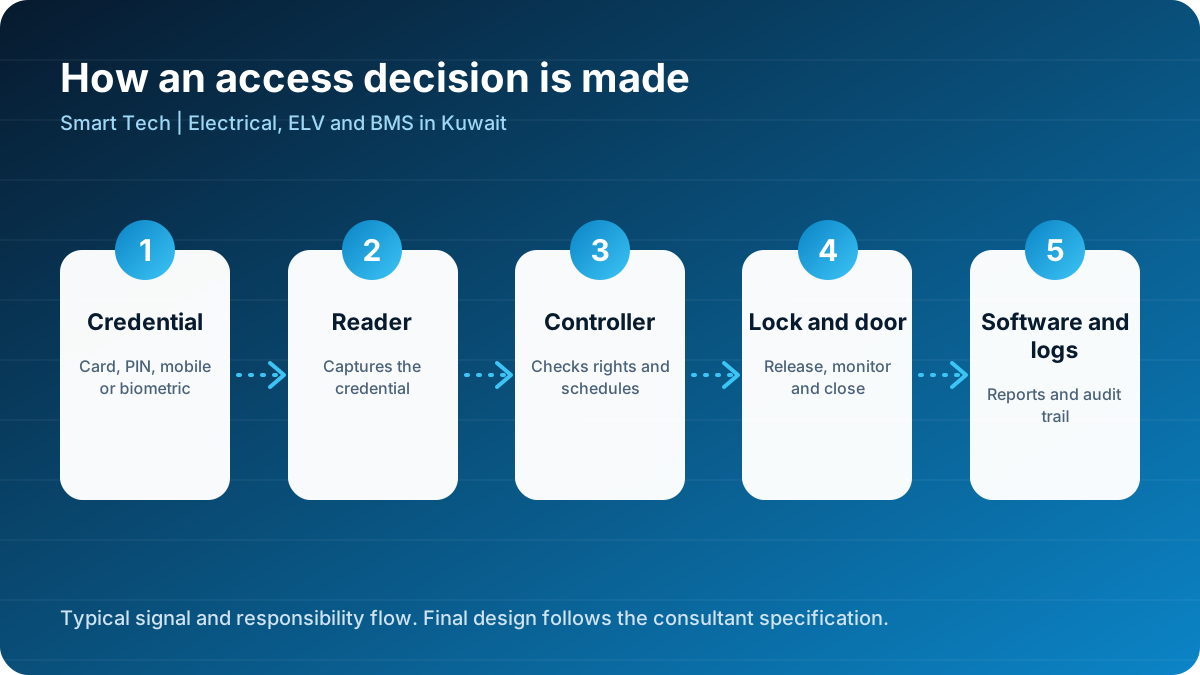
The four building blocks
Every access control system has the same four building blocks, regardless of brand.
- Credential. The thing a person presents: a card, a PIN, a fingerprint, a face or a phone.
- Reader. The device at the door that reads the credential.
- Controller. The decision-maker. It checks the credential against stored rights and time schedules and decides whether to release the lock.
- Lock and door hardware. The electric strike, magnetic lock or motorised lock that actually holds the door, along with door contacts, exit buttons and closers.
Behind these sits the software, which stores users, rights, schedules and event logs, produces reports and often connects to other systems. The general concept is described on Wikipedia's access control page, and system requirements for electronic access control are the subject of standards such as the IEC 60839-11 series, available through the IEC.
Choosing a credential
| Credential | Strengths | Weaknesses | Best for |
|---|---|---|---|
| PIN code | No hardware to carry, cheap | Easy to share or observe | Low-risk internal doors |
| Proximity card | Fast, familiar, easy to revoke | Can be lost or lent | Offices, apartments, schools |
| Smart card | Higher security, can hold more data | Higher cost | Corporate and government sites |
| Mobile credential | Convenient, no card cost | Depends on phone and app | Modern offices, visitors |
| Fingerprint | Ties access to the person | Hygiene, wear, privacy rules | Server rooms, staff time and attendance |
| Face recognition | Touch-free, fast | Needs good lighting and privacy care | High-traffic entrances |
Think in terms of risk. A storeroom door needs less than a data centre. A good design uses different levels for different areas, and may combine two factors, such as card plus PIN, for the most sensitive rooms.
Locks: the part that determines safety
The choice of lock is partly a security decision and partly a life-safety decision.
- Electric strike. Releases the latch on the door frame. Good for doors with an existing mechanical latch. The door remains lockable by key.
- Magnetic lock. Holds the door with an electromagnet. Simple and fast, and it releases immediately when power is cut. Requires reliable release on fire and sometimes an additional emergency release.
- Electric mortise or lock case. Built into the door, giving a clean appearance and strong holding.
- Motorised locks. Used on high-security doors and some glass doors.
- Turnstiles and speed gates. Control the flow of people at lobbies and sports sites.
Fail-safe and fail-secure
A fail-safe lock unlocks when power is lost. A fail-secure lock stays locked. Escape routes must allow free exit, so locks on escape doors are normally fail-safe or have a mechanical means of exit. Doors to storerooms may be fail-secure. The choice for each door should be written in a door schedule agreed with the consultant and the fire authority.
Design: start with the door schedule
A door schedule lists every opening that will be controlled, with its location, type, direction of control, credential level, lock type, fire behaviour and other requirements. It is the central document of an access control design. Typical columns include:
- Door ID and location
- Who may enter and who may exit
- Reader at entry, exit button or reader at exit
- Lock type and fail mode
- Door position contact and alarm
- Interface to the fire alarm
- Notes, such as a request-to-exit sensor
Skipping this step and counting readers instead is a common cause of design errors and variation claims.
Fire safety and access control
Fire safety must override security. A system must never trap people in a fire.
- Doors on escape routes must release on fire alarm and on power loss, unless a local rule or the consultant approves another method.
- Emergency break-glass units next to doors provide a manual release.
- The interface between the fire alarm and the access control system should be a dedicated, monitored connection.
- After a fire alarm, doors should stay released until the panel is reset by an authorised person.
Standards organisations such as NFPA publish life-safety guidance on egress and locking arrangements, and the consultant will define the rules for your project.
Integration with other systems
An access control system becomes much more useful when it works with other systems.
- CCTV. Link a door event, such as a forced door or an invalid card, with the camera view. Read more in our CCTV guide.
- Intruder alarm. Arm and disarm zones automatically based on who is present.
- Lifts. Restrict floors to authorised users.
- Lighting and air conditioning. Switch on lights and cooling when the first person arrives, as discussed in lighting control and energy savings.
- Time and attendance. Use door events for staff attendance where it is acceptable and lawful.
- Visitor management. Issue temporary credentials with limited time and area.
Network and power
- Power each lock correctly. Locks draw significant current. Use properly sized power supplies with battery backup and protect them from voltage spikes.
- Plan cable routes. Reader, lock, contact and exit button cables should be correct type and clearly labelled. Poor cable is a leading cause of faults.
- Separate networks. Controllers and servers should be on a protected network segment with limited access.
- Backup the database. Back up users and rights regularly and store a copy off the server.
Typical sites and solutions
Offices and corporate buildings
Use card or mobile credentials at main entrances, floors and sensitive rooms, with visitor management at reception. Kuwait City has many offices of this type. See our page on Kuwait City.
Clinics, schools and mixed-use buildings
Controlled entrances, staff-only areas and pharmacies or storerooms. Farwaniya has many buildings where a small system can be extended later. See Farwaniya.
Residential towers and compounds
Card or app entry for residents, video intercom for visitors, controlled car parks and lift access. Salmiya and Hawalli have many such buildings. See Hawalli and Salmiya.
Villas
Gate entry, keypad or mobile access at doors and integration with home automation.
Industrial and public sites
Turnstiles, vehicle barriers and heavy-duty readers. See Al Ahmadi and Fahaheel and our industries page.
Privacy and policy
Access logs record where people go. Decide who can see the logs, how long they are kept and what they may be used for. If you use biometrics, follow best practice: collect only what you need, store templates securely and explain to staff how the data is used. A short written policy builds trust and prevents disputes.
Installation and commissioning
During installation, doors are the main source of problems. Door frames, closers and hinges must work correctly before the lock is fitted. A lock fitted to a door that does not close properly will fail repeatedly. Commissioning should include:
- Checking the door closes and latches without force.
- Testing every reader, lock, contact and exit button.
- Testing fire release for each door with the fire alarm.
- Testing power failure behaviour.
- Loading users, groups and schedules.
- Training operators on adding users, removing users and reading reports.
Common mistakes
- No door schedule. The scope is guessed.
- Magnetic locks without proper release. Safety risk.
- Poor power supplies. Locks that draw more current than the supply provides cause random faults.
- No plan for lost cards. The process to cancel credentials must be quick.
- No integration plan. Systems are installed but never connected.
- Ignoring the door. Hardware that does not suit heavy traffic fails quickly.
Maintenance
- Monthly: check door closing, review alarm events and test exit buttons.
- Quarterly: test batteries and power supplies, clean readers and inspect hinges and closers.
- Annually: review all users and rights, test the fire release, update software and check the backup.
Quotation checklist
When you compare proposals, ask:
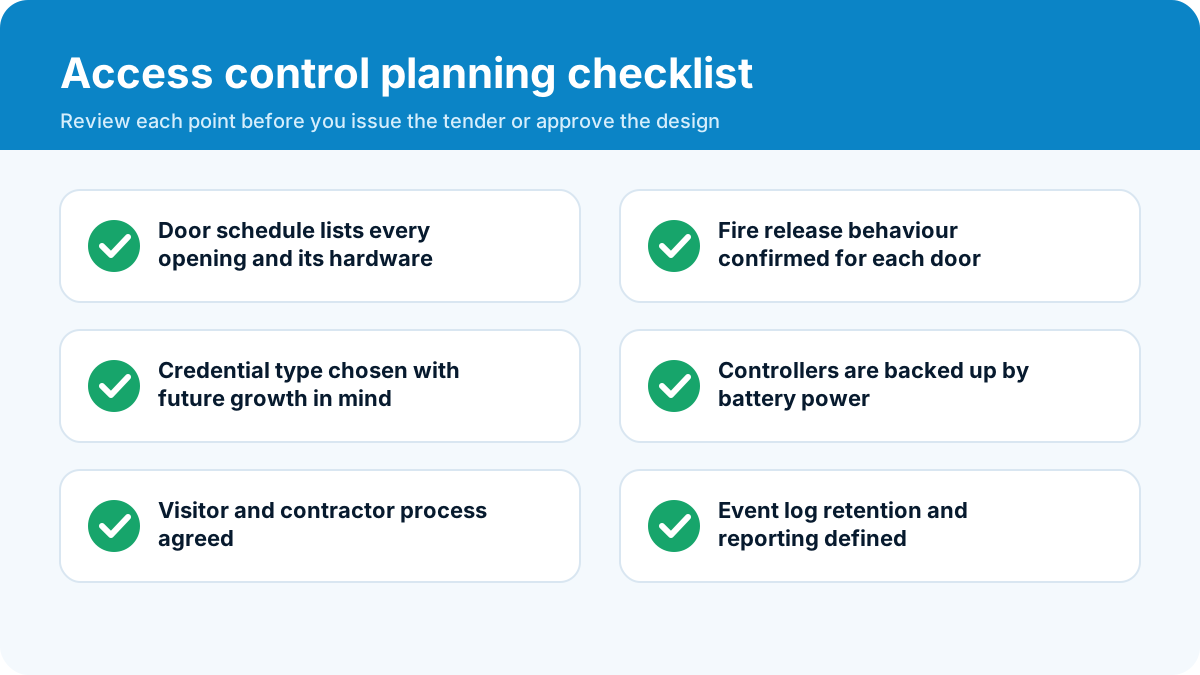
- Is there a door schedule with the fail mode for each door?
- Are readers, controllers and locks named by model?
- Are power supplies and batteries included?
- Is software licensing explained, including future fees?
- Who connects the fire alarm interface?
- What training and warranty are offered?
A worked example: a three-floor clinic in Farwaniya
Imagine a clinic with a reception, ten consulting rooms, a pharmacy store and a server cupboard. The owner wants staff to use one card, patients to be kept out of clinical areas and the pharmacy store to be strictly controlled. A sensible design would look like this.
- Main entrance: open during opening hours, with a reader that locks the door out of hours and a video intercom for deliveries.
- Staff door and clinical corridors: card readers on the doors between the waiting area and the consulting rooms, with a request-to-exit button on the inside.
- Pharmacy store: card plus PIN, with an alarm if the door is held open too long and a camera covering the approach.
- Server cupboard: card for the IT manager only, with every entry logged and reported weekly.
- Fire safety: all escape doors release on fire alarm, and the main entrance has a manual break-glass release.
This is a small system with perhaps eight controlled doors, but it follows the same logic as a large one: define who needs to go where, write it in a door schedule and then choose hardware that matches. The same thinking applies to dental practices, small schools, training centres and professional offices throughout Kuwait.
Questions owners often forget to ask
Before the system is installed, a few practical questions save a lot of frustration later.
- Who will administer the system day to day? Someone must add new staff, remove leavers and answer questions. If that person has no training, rights will drift and security will weaken.
- How are visitors and contractors handled? Temporary credentials with an expiry time are safer than lending permanent cards.
- What happens at the weekend and during holidays? Schedules should reflect real working patterns, including shifts, Fridays and public holidays.
- What is the plan if the server fails? Controllers should keep working and store events locally, then upload them when the server returns.
- How will you prove who was at a door? If an investigation is ever needed, matching an access log to video is the strongest evidence, so keep the clocks of both systems synchronised.
Answering these in advance turns access control from a gadget into a managed process.
Finally, remember that access control is a living system. People join, change roles and leave every month, and the rights in the software should follow them. Schedule a short review every quarter in which a manager confirms the list of users and the areas each one can enter. This ten-minute habit closes the gaps that cause most real-world security failures.
Talk to us
If you are planning a new building, upgrading a system with failing readers or adding doors to an existing installation, send us the drawings or a short description. Our engineers will prepare a door schedule and a clear quotation. Use the quote form or call +965-51133630. You can also browse our security systems and the full list of services.
Security should be convenient enough that people use it and strict enough that it matters. A well planned access control system achieves both.
Frequently asked questions
What is the best credential for an office: card, PIN or fingerprint?
Cards or mobile credentials are the most practical for most offices because they are fast and easy to revoke. PIN codes are cheap but easy to share. Biometrics add certainty about the person but need careful setup and privacy handling. Many sites combine two methods for high-security rooms.
What happens to the doors if the power fails?
It depends on the lock type and the design. Fail-safe locks unlock when power is lost, while fail-secure locks stay locked. Escape routes must always allow people to leave, so fire and life-safety rules decide the lock choice for each door.
Can access control connect to the fire alarm?
Yes. A properly designed system releases the doors on escape routes when the fire alarm activates, through a dedicated and monitored interface.
How many people and doors can a system manage?
Modern systems scale from a few doors to thousands. The size is limited by the controller and software chosen, so state your growth plans during design.
Can I use my phone as a key?
Yes, many systems support mobile credentials over Bluetooth or NFC. They are convenient, but the reader, software and phone support must match.